Stack Notes
Stack Notes is a powerful task management and note-taking system designed to keep your team aligned and organized. It allows you to create personal notes, prioritize tasks, and collaborate seamlessly with your team.
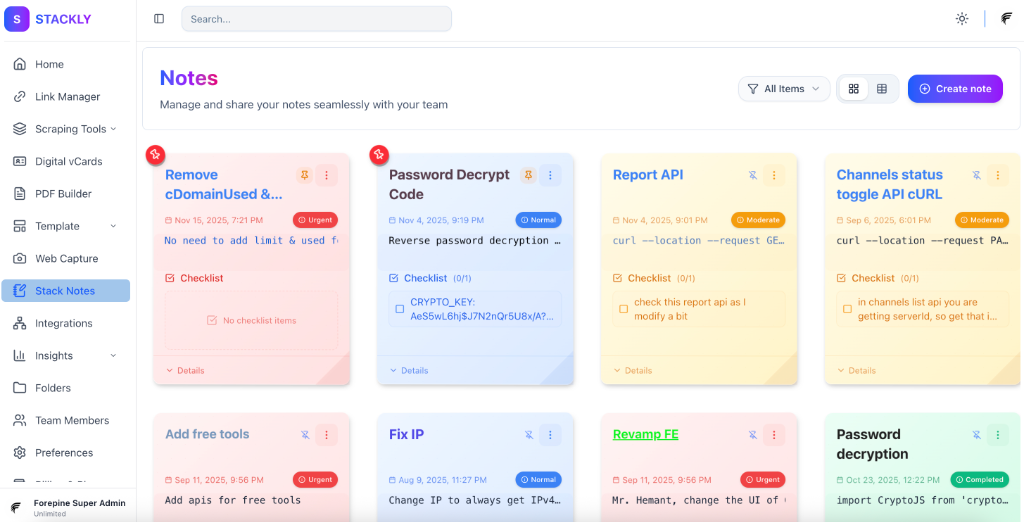
Key Features
📝 Rich Text Formatting
Customize your notes with extensive formatting options:
- Titles: Support for
H1,H2, andH3tags with custom colors and styles. - Content: Rich text support including
H4,H5,H6, Paragraph (p), Bold (b,strong), Italic (i), Underline (u), and Highlight (mark). - Styling: Apply custom colors and style attributes to any text element.
✅ Interactive Checklists
Create detailed checklists to track progress. Each item can have its own color and completion status.
🔄 Status & Prioritization
Organize your notes with a color-coded status system:
| Status | Condition | Color | Description |
|---|---|---|---|
| Normal | normal | 🟡 Yellow | Default state for new notes |
| Moderate | moderate | 🟠 Orange | Medium priority tasks |
| Priority | priority | 🔴 Red | High priority or urgent items |
| Completed | completed | 🟢 Green | Finished tasks |
👥 Team Collaboration
Collaborate with your team members on shared notes and tasks.
- Collaborators: Add team members by email to share access.
- Tags: Organize notes with custom tags for easy filtering.
👁️ Owner Visibility
To ensure transparency and effective management, the Account Owner has the ability to view all notes created by team members within the organization.
Getting Started

- Navigate to the Stack Notes section in your dashboard.
- Click New Note.
- Use the formatting toolbar to structure your content.
- Set the Status to indicate priority.
- Add Collaborators to work together.